Executive Summary
Abstract
Model Context Protocol (MCP) is an open, standardized connection protocol. NetSuite’s AI Connector Service is Oracle’s MCP implementation; the MCP Standard Tools SuiteApp supplies common NetSuite actions; and custom MCP tools expose organization-specific logic. Together, they let an external AI client work with NetSuite through defined, permission-controlled tool calls, not broad, raw API access.
The AI Connector is most useful when an organization needs an external model, access to custom NetSuite data, or a controlled way to put AI into production use.
The AI Connector does not consume NetSuite AI Units for inference performed by the external model provider (see Section 4). This does not extend to native NetSuite AI features or other NetSuite operations, which may have their own usage implications.
The architecture at a glance
Figure 1 separates four concepts: the AI client, the AI Connector layer, the tools exposed through it, and the NetSuite account whose permissions govern access and whose execution logs provide an operational trace.
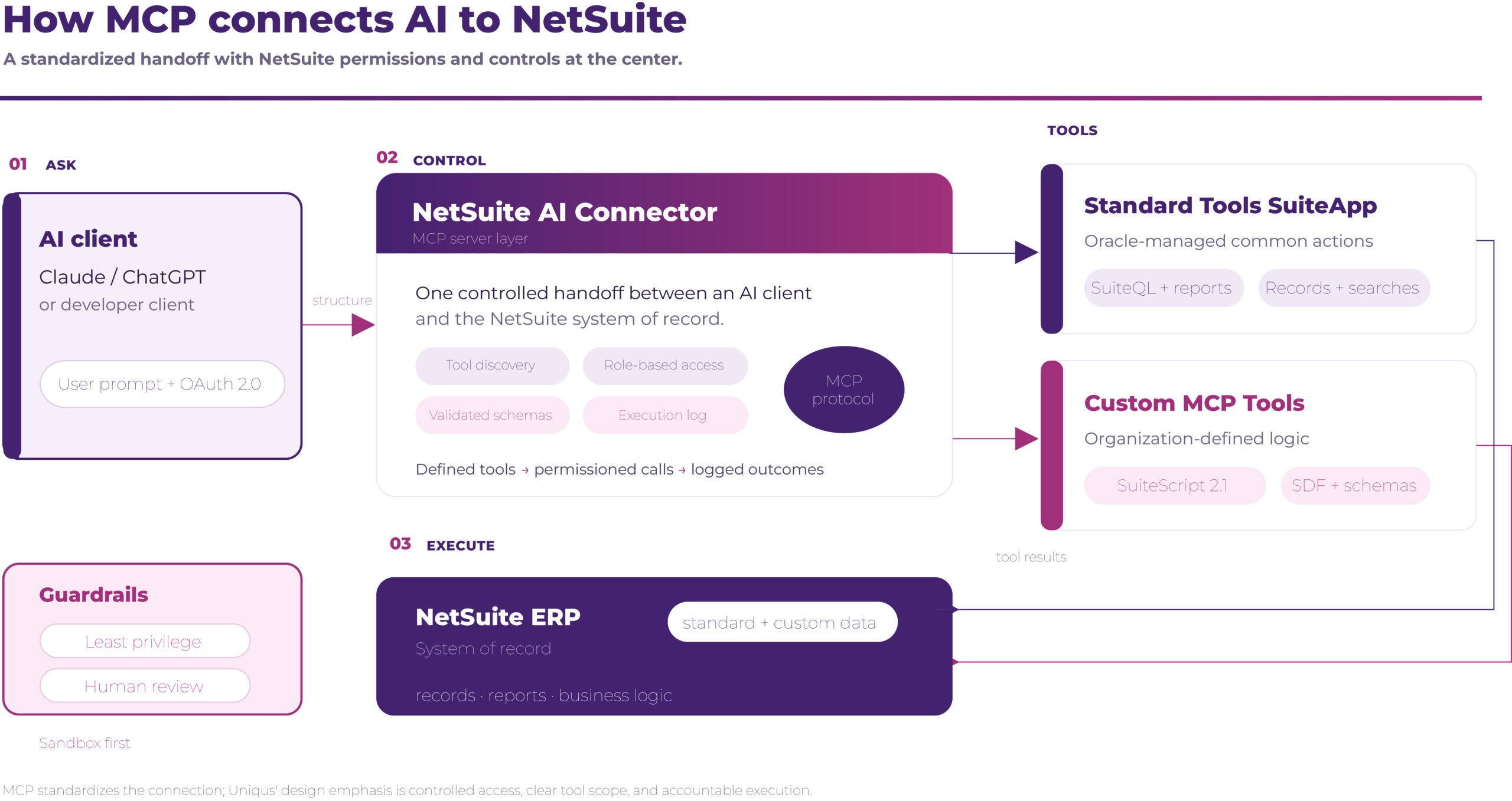
Figure 1. How MCP connects AI to NetSuite (conceptual flow).
What MCP changes
MCP is an open standard introduced by Anthropic in late 2024 for defining how AI systems communicate with external applications. Instead of building a separate integration for every model and system, MCP standardizes the interaction between a client, a server, and the tools or resources the server exposes. See the MCP specification and MCP introduction.
In NetSuite, the AI Connector Service acts as the MCP server layer. The external AI client can request data or an action, such as a saved search, report, SuiteQL query, or record operation, through a tool definition with an explicit scope. NetSuite determines which tools appear and what the connected role can access.
Keep the terms distinct
- MCP = the protocol.
- AI Connector Service = Oracle’s implementation.
- MCP Standard Tools SuiteApp = Oracle-managed prebuilt tools.
- Custom MCP tools = organization-defined SuiteScript operations.
Standard tools and custom tools
The MCP Standard Tools SuiteApp
The MCP Standard Tools SuiteApp is a free, Oracle-managed SuiteApp that runs on the AI Connector Service and is automatically updated by Oracle. It covers common interactions with NetSuite, including queries, reports, saved searches, and record operations, subject to the connected role’s permissions. The SuiteApp is Oracle-managed; custom tools remain an implementation responsibility. See Oracle’s Standard Tools documentation.
- SuiteQL queries
- Access to NetSuite reports
- Record creation and updates
- Retrieval of saved-search results
Visibility is permission-driven. A tool appears only when the connected role has the required permissions, and the AI client cannot use the connection to see data that role cannot see in NetSuite. This is a platform-enforced access boundary, not a guarantee that the selected role, tool logic, or business process is appropriately designed. Review Oracle’s required features and permissions before deployment.
Custom MCP tools
Custom tools are where the connector becomes specific to an organization’s operating model. Using SuiteScript 2.1 and the SuiteCloud Development Framework (SDF), teams define the input schema, output format, and execution logic, then deploy and manage the tool under Customization > Scripting > Custom Tools.
| Custom tool pattern | Example |
|---|---|
| Expose custom data | Return renewal status, annual recurring revenue, and next renewal date from a subscription record. |
| Stage, do not post | Validate a vendor document and route it for review rather than auto-posting it. |
| Orchestrate a process | Run a multi-step close checklist and return a structured status report. |
| Constrain the action | Return a confidence-scored extraction from a custom document type. |
The security principle is that a custom tool can do only what its code and schema permit. This is a meaningful constraint compared with giving an AI client broad API credentials, but it does not remove defects, unsafe business logic, or misuse. Treat the schema and execution logic as production code: test it, version it, review it, and monitor it. Oracle documents the custom tool model.
Compatibility and setup
Oracle documents compatibility paths for Claude Pro or higher and ChatGPT, subject to client, account, and version requirements. ChatGPT custom MCP support and permissions can vary by plan. Validate the current provider requirements before rollout; compatibility is not the same as production readiness. See Anthropic’s MCP documentation and OpenAI’s custom MCP guidance.
NetSuite prerequisites
- Enable Server SuiteScript, REST Web Services, and OAuth 2.0 under Setup > Company > Enable Features.
- Install the MCP Standard Tools SuiteApp from the SuiteApp Marketplace.
- Create a dedicated, non-Administrator MCP role. Oracle blocks the Administrator role from MCP connections by design.
- Apply record-level permissions only for the data and actions required by the use case.
- Test the complete flow in Sandbox before Production; treat Sandbox data with the same security discipline as Production data.
Minimum role permissions
| Permission | LeveL |
|---|---|
| MCP Server Connection | Full |
| OAuth 2.0 Access Tokens | Full |
| REST Web Services | Full |
| Record-level permissions | Only the required records and actions |
For organizations subject to the Sarbanes-Oxley Act (SOX), a purpose-built MCP role also creates a cleaner separation between human and machine access and is easier to defend in an audit than a broadly privileged role.
Endpoint pattern
- General AI Connector endpoint
- SuiteApp-specific endpoint
Replace <accountid> with the NetSuite account ID. The /all endpoint exposes all available tools for the connection; a SuiteApp-specific endpoint narrows the surface to that SuiteApp. In our view, start with the SuiteApp-specific endpoint. Client configuration and OAuth steps vary by provider, so validate the current Oracle and provider documentation before implementation.
The cost and data boundary
The AI Connector does not consume NetSuite AI Units for inference performed by the external model provider. Provider charges and policies still apply, and this should not be generalized to native NetSuite AI features or other NetSuite operations that may consume AI Units or carry separate limits.
Model inference runs outside NetSuite, with the selected large language model (LLM) provider, so inference costs follow the provider’s pricing model rather than the organization’s NetSuite AI Unit allocation.
This creates a design choice: external-model inference through the AI Connector is outside NetSuite AI Unit consumption, while native NetSuite generative features may have separate AI Unit implications. Confirm the specific feature and operation before making a cost claim; Oracle’s AI Units FAQ is the authoritative reference.
The data boundary matters just as much as the cost boundary. Oracle’s disclosure is that data sent to a third-party LLM is governed by that provider’s privacy and data-handling policy. Before production use, review data residency, retention, training use, contractual controls, and the categories of NetSuite data that the MCP role can expose.
Where the connector creates value
| Value lever | Why it matters |
|---|---|
| Custom records and fields | Native AI may not understand the custom data and proprietary logic that make a NetSuite account useful. Custom tools can expose both as structured operations. |
| Model choice | The AI Connector works with more than one AI client, including Claude and ChatGPT, allowing the organization to choose its provider and adapt as model capabilities change. |
| Structured scope | Explicit tool definitions limit what the AI client can call and provide a clearer boundary than broad API credentials. |
| Role-based access | The AI client inherits the connected NetSuite role rather than creating a separate, parallel permission model. |
| Traceability | AI Connector execution logs provide an operational trace of each tool call. |
| Less custom integration work | For some use cases, the Oracle-maintained AI Connector can reduce the need for custom RESTlets, SOAP integrations, or middleware built only to expose NetSuite data to an AI client. |
In our view, the highest-value use case is usually not “ask a chatbot about a standard record.” It is exposing the organization’s own data model and process logic while preserving explicit controls around what the AI client can read, propose, and execute.
Three layers of control
A governed deployment separates platform capabilities from implementation responsibilities and organizational governance. Keeping those layers distinct prevents a role boundary or an execution log from being mistaken for a complete control framework.
| Layer | What it covers |
|---|---|
| Platform controls | NetSuite and Oracle provide role-permission enforcement, OAuth and connection requirements, defined tool surfaces, and MCP execution logs. These are platform capabilities, not a complete safety or audit guarantee. |
| Implementation controls | The solution team must narrow role and tool scope, validate inputs and outputs, enforce approvals server-side, prevent duplicates, set limits on retries and timeouts, handle partial failures, and provide rollback or compensating actions. |
| Organizational controls | Finance and control owners must define segregation of duties, approval policy, evidence retention, periodic access and tool review, monitoring thresholds, and incident response. |
Financial-control design for write actions
For finance workflows, “human approval” is only a control when the system technically blocks the consequential action until an authorized approval is recorded. The minimum design should address:
| Control objective | Minimum design expectation |
|---|---|
| Duplicate prevention / idempotency | Use a stable external ID (where the record type supports it) or an equivalent idempotency key, check-before-create logic, and safe handling of resubmissions. |
| Limits and timeouts | Set limits on transaction size, rows, model tokens, concurrency, and execution time; fail closed (stop and report) rather than silently truncating or posting incomplete work. |
| Partial failures and retries | Make retries bounded and state-aware; distinguish safe retry from duplicate risk; surface unresolved items for review. |
| Approval gates | Enforce approval in a server-side workflow or tool logic, tied to an authorized role and the exact transaction payload, not only a prompt or user interface convention. |
| Rollback / remediation | Define compensating transactions, reversal procedures, and ownership for correcting an erroneous or partial write. |
| Segregation of duties | Separate request, approval, execution, and reconciliation; do not let one MCP role combine those duties. |
| Evidence and monitoring | Retain approval, request, result, exception, and reconciliation evidence; monitor failures, unusual volumes, retries, and drift. |
Oracle documents MCP execution logs with time, duration, status, user, HTTP status, method, URL path, and request details. Production retention is 21 days and Sandbox retention is 7 days; treat these logs as an operational trace, not automatically as the organization’s complete financial audit evidence. Export logs to your own store before they expire. See Oracle’s logging guidance.
Where practitioners should be careful
| Risk | Practical control |
|---|---|
| Prompt injection in external content | Limit what the AI client can ingest; validate inputs in tool definitions; do not treat instructions inside invoices, vendor notes, or uploaded documents as trusted intent. |
| Over-permissioned roles | Audit the role before connection and create a dedicated, non-Administrator MCP role. AI can exercise excess access systematically and at speed. |
| Hallucinated financial actions | Do not rely on a generic human-in-the-loop step. Enforce the server-side approval gate described in Section 6, and add idempotency, duplicate checks, and a compensating-transaction path. |
| External LLM data handling | Review the selected provider’s privacy, data residency, retention, and training-use policies; minimize the data exposed by the MCP role. |
| Client-side script behavior | Client-side SuiteScript does not fire through MCP record operations. Test the full customization stack in Sandbox and identify workflows that depend on the user interface. |
| Community MCP bridges | Treat community MCP bridges as additional software: assess security posture, maintenance, compatibility, and ownership before relying on them. |
| Setup complexity | Use the connector where custom records, external model choice, or a defined control objective justify the effort. For standard conversational queries, Ask Oracle (see Section 8) may be simpler; neither option removes the need for role, workflow, and monitoring controls. |
A safe rollout pattern
Classify the data the role can expose, then start read-only with a narrow role and a small tool set. Add writes only after server-side approvals, idempotency, bounded retries/timeouts, logging, security testing, permission review, and Sandbox validation are in place. Test failure and recovery paths, not only the expected case.
AI Connector or Ask Oracle?
These capabilities are complementary rather than interchangeable:
Choose Ask Oracle when…
- You need conversational access to standard NetSuite data with minimal setup.
- You prefer a native, Oracle-managed assistant and do not need to choose an external model.
- Your use case is primarily read-oriented and fits the native feature set.
Choose the AI Connector when…
- You need access to custom records, custom fields, or proprietary process logic.
- You want model or provider flexibility.
- You need structured, purpose-built tools that can stage or orchestrate a business process.
Ready to connect AI to NetSuite?
The AI Connector is not just an enablement task. The implementation succeeds or fails on the decisions made before the first AI client connects to NetSuite: which role the AI client uses, which tools it can call, what data can leave the environment, where a human must approve, and how every action will be monitored. In our view, organizations that treat those decisions as architecture, not configuration, are better positioned to turn MCP connectivity into a durable control surface for AI.
Implementation takeaway
Start narrow, design for review, and expand only when control test results and monitoring evidence support it. The AI Connector’s value is not unrestricted access to NetSuite; it is a standardized way to expose the right data and actions with enough structure to govern them.
How Uniqus can help
Uniqus can help organizations move from connector enablement to governed adoption: define the target use cases and control boundaries; design least-privilege roles, standard and custom tool scope, and approval workflows; build and test custom MCP tools; validate security, failure handling, and financial controls in Sandbox; and establish monitoring and operating ownership for Production. To discuss an assessment or implementation roadmap, contact us.